快速入门
Neo4j 是一个高性能的 NoSQL 图形数据库,它将事物之间的关系存储为数据库技术,广泛用于知识图谱,社交关系链,商品推荐,IT架构,商品主数据等领域。Neo4j 也可以被看作是一个高性能的图引擎,该引擎具有成熟数据库的所有特性。
Neo4j 官方提供了三个版本:Neo4j Community Edition, Neo4j Enterprise Edition, Neo4j Desktop
在云服务器上部署 Neo4j 预装包之后,请参考下面的步骤快速入门。
准备
部署 Websoft9 提供的 Neo4j 之后,需完成如下的准备工作:
- 在云控制台获取您的 服务器公网IP地址
- 在云控制台安全组中,确保 Inbound(入)规则 下的 TCP:80 和 7687 端口已经开启
- 在服务器中查看 Neo4j 的 默认账号和密码
- 若想用域名访问 Neo4j,务必先完成 域名五步设置 过程
Neo4j 初始化向导
详细步骤
-
使用 SSH 客户端连接 Neo4j 所在的服务器,输入
cypher-shell命令,并登录(不知道密码?)$cypher-shell
username: neo4j
password: *****
Connected to Neo4j 4.1.0 at neo4j://localhost:7687 as user neo4j.
Type :help for a list of available commands or :exit to exit the shell.
Note that Cypher queries must end with a semicolon.
neo4j@neo4j> -
输入命令
CALL dbms.showCurrentUser();查看当前用户neo4j@neo4j> CALL dbms.showCurrentUser();
+--------------------------+
| username | roles | flags |
+--------------------------+
| "neo4j" | admin | [] |
+--------------------------+
1 row available after 22 ms, consumed after another 1 ms -
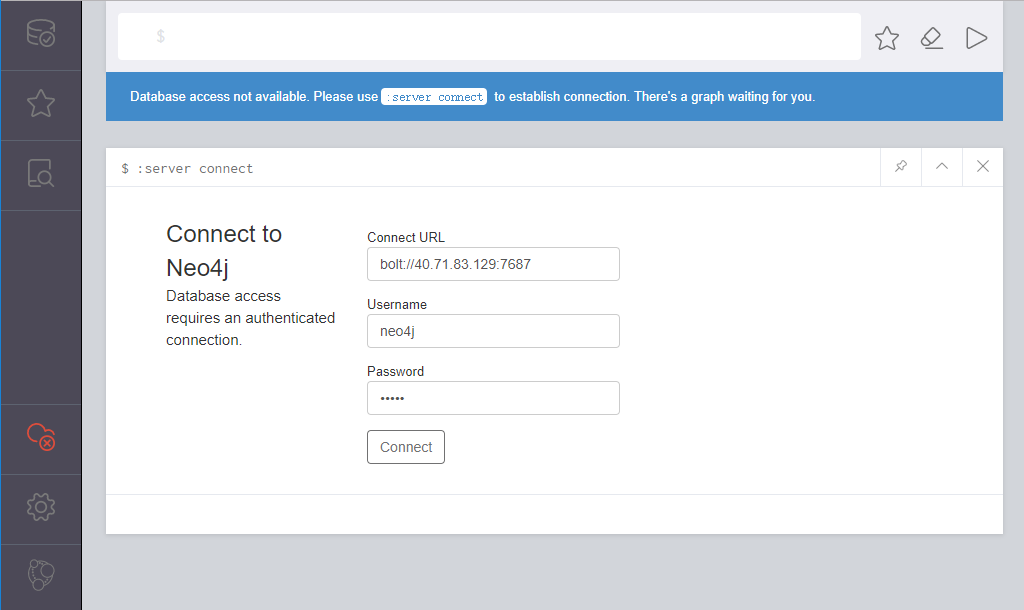
体验图形化管理工具 Neo4j Browser
官方文档:Neo4j Documentation
出现问题?
若碰到问题,请第一时刻联系 技术支持。也可以先参考下面列出的问题定位或 FAQ 尝试快速解决问题:
能够访问 Neo4j Browser,但是连接数据库报错?
您的服务器对应的安全组 7687 端口没有开启(入规则),导致无法连接数据库
为什么 Neo4j Browser 中 Roles 显示为空?
Neo4j 社区版不支持 Roles,故显示为空
Neo4j 入门向导
下面以 分析电影数据 作为一个任务,帮助用户快速入门:
用范例数据分析
控制台提供了一个经典范例 Movie Graph,根据范例提供的向导可以完成如下动作:
- 创建:将电影数据插入图形
- 查找:检索单个电影和演员
- 查询:发现相关的演员和导演
- 解决:分析某个演员的六度空间关系
-
登录 Neo4j Browser
-
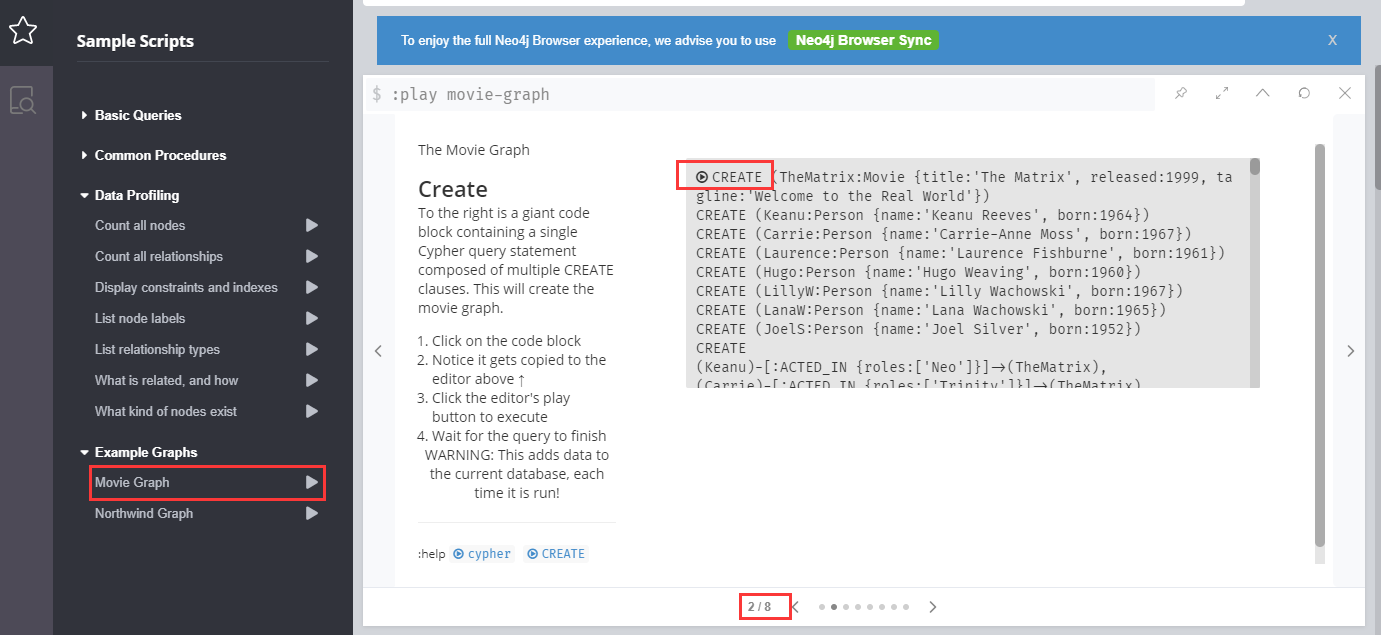
打开:【Sample Scripts】>【Example Graphs】>【Movie Graph】,点击2/8页下的【Create】图标
-
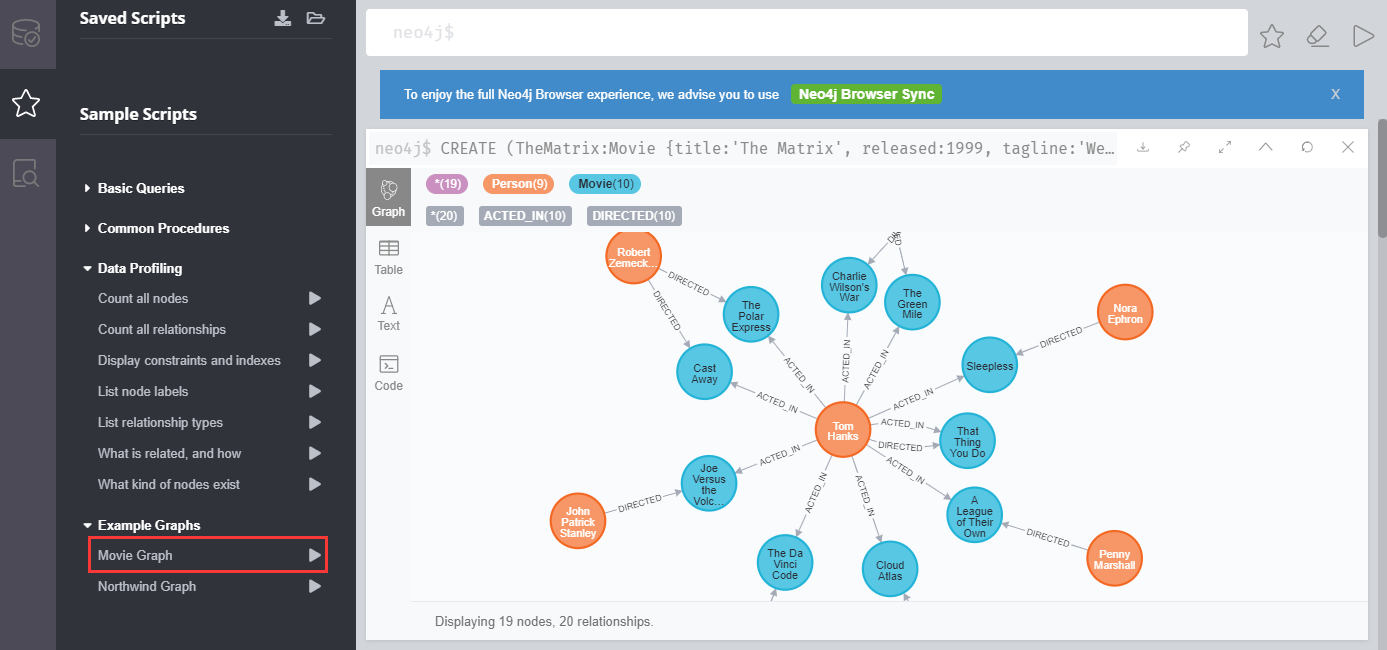
立即可见已经建立了关系的数据
-
根据向导依次完成后续的页面中的范例
自建数据并分析
-
登录 Neo4j Browser,运行下面的命令录入三条节点数据
create (n:Person { name: 'Tom Hanks', born: 1956 }) return n;
create (n:Person { name: 'Robert Zemeckis', born: 1951 }) return n;
create (n:Movie { title: 'Forrest Gump', released: 1951 }) return n;
-
运行查询所有节点数据的命令,便可以看到图形化展示出的数据
match(n) return n;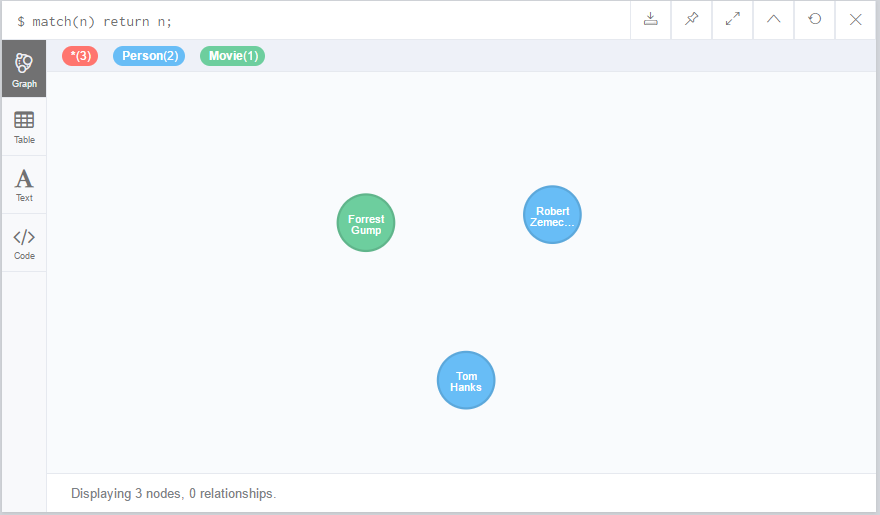
-
接下来运行下面的命令,给节点创建关系
MATCH (a:Person),(b:Movie)
WHERE a.name = 'Robert Zemeckis' AND b.title = 'Forrest Gump'
CREATE (a)-[r:DIRECTED]->(b)
RETURN r; -
再次运行查询节点数据的命令
match(n) return n;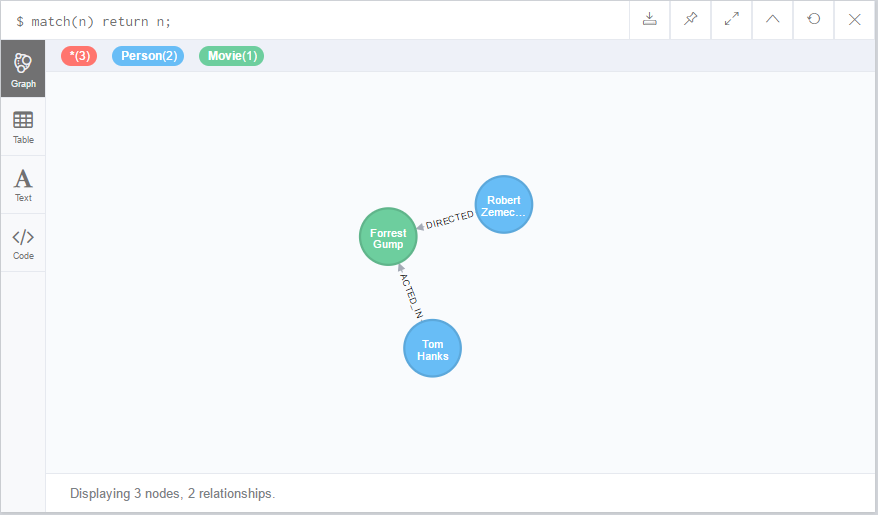
导入数据进行分析
Neo4j 常用操作
开启远程访问
-
Neo4j 所在的服务器的安全组,需开启 7687 端口
-
确保Neo4j 配置文件 中没有限制外网IP访问(默认 0.0.0.0 表示允许)
# With default configuration Neo4j only accepts local connections.
# To accept non-local connections, uncomment this line:
dbms.default_listen_address=0.0.0.0
用户管理
Neo4j 提供了详细的用户管理和角色管理功能(仅企业版支持)
# 显示所有用户
SHOW USERS;
CALL dbms.security.listUsers();

# 创建新用户,第三个参数表示 requridchangepassword
CALL dbms.security.createUser('username','password',false);

# 删除用户
CALL dbms.security.deleteUser('username');
详情参考官网文档:User and role management
图形化工具
Neo4j 提供了多种图形化工具,有基于 Web 的版本,也有支持 Windows, Linux, macOS 等桌面版本。
在使用图形化工具之前,请确保开启了远程访问。
Neo4j Browser
Neo4j Browser 是开发人员与图形进行交互的工具。它是Neo4j数据库的企业版和社区版的默认界面。
-
本地浏览器访问:http://域名 或 http://服务器公网IP, 访问 Neo4j Browser
-
选择【bolt://】的URL模式,输入用户名和密码(不知道密码?),可能还需提示立即修改密码
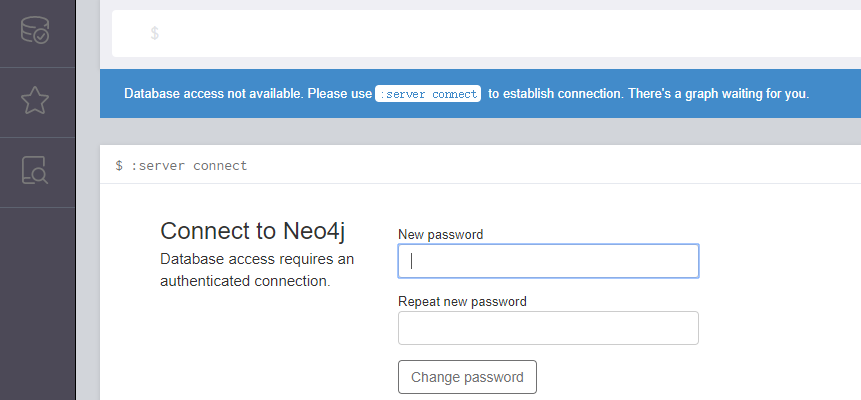
Pick neo4j:// for a routed connection, bolt:// for a direct connection to a DBMS. 选择 bolt:// 速度更快
-
系统登录到控制台,初始化安装完成
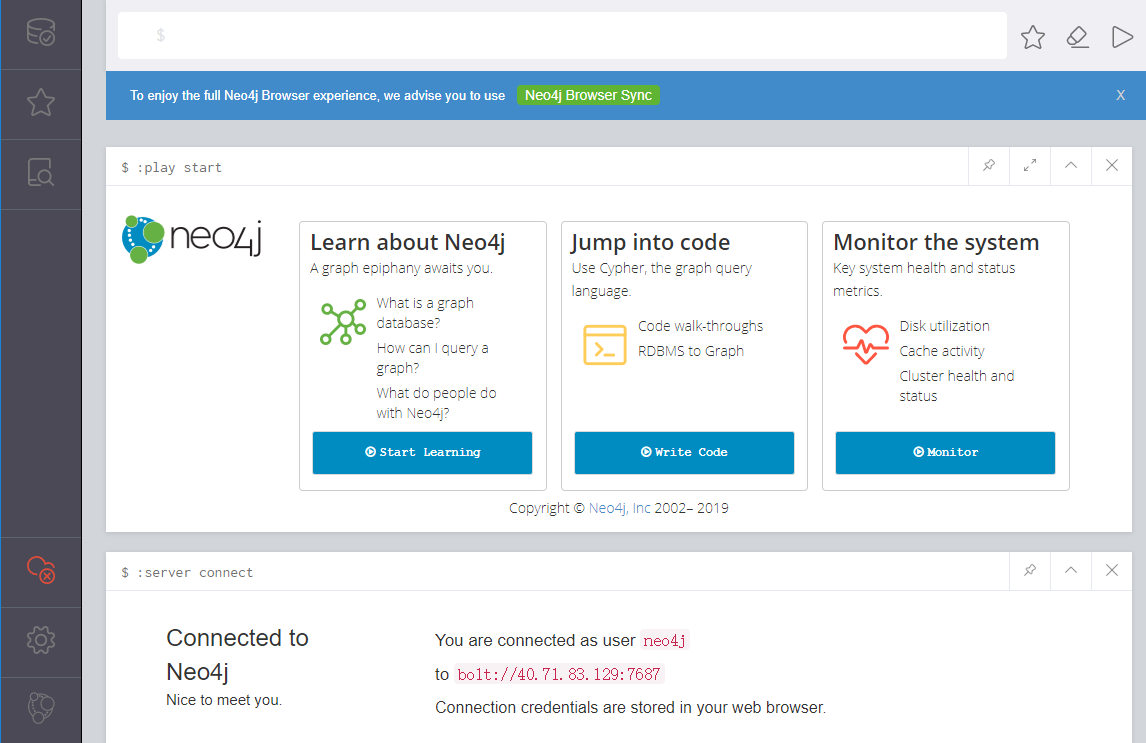
-
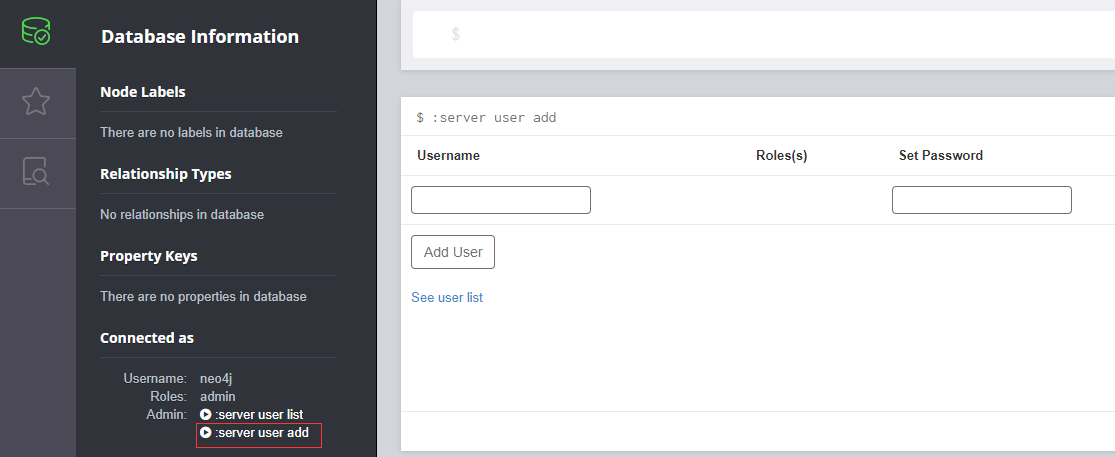
通过:【Database Information】>【server user add】 增加新用户
-
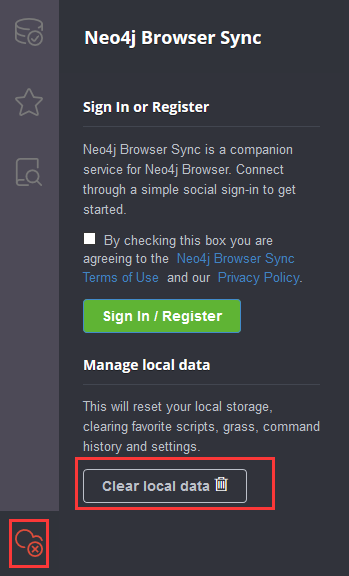
通过:【Cloud Services】>【Clear local data】 退出 Neo4j Browser
Neo4j Desktop
Neo4j Desktop 是开发人员使用本地Neo4j数据库的便捷方式。
-
双击安装至完成,然后到 Neo4j 官网上注册,获取一个秘钥
-
激活 Neo4j Desktop
-
连接到远程 Neo4j 数据库,开始使用
Neo4j Bloom
探索和可视化图形数据,这是一个付费的工具。
重置密码
常用的 Neo4j 重置密码相关的操作主要有修改密码和找回密码两种类型:
修改密码
修改密码只需登录服务器后运行一条命令即可:
下面的示例是将旧密码neo4j更改为新密码neo4j123:
echo "
ALTER CURRENT USER SET PASSWORD FROM 'neo4j' TO 'neo4j123';
" | cypher-shell -u neo4j  -p neo4j  -d system
找回密码
如果用户忘记了密码,通过配置文件临时去掉验证,然后设置密码,再复原的方法找回密码:
-
停止 Neo4j
sudo systemctl stop neo4j -
修改 Neo4j 的配置文件,将
#dbms.security.auth_enabled=false改成dbms.security.auth_enabled=false -
重新启动 Neo4j 服务后,开始修改密码
sudo systemctl start neo4j
cypher-shell -d system

neo@system> ALTER USER neo4j SET PASSWORD 'mynewpass';
neo@system> :exit -
复原配置文件
-
重启 Neo4j 服务
以上方案来自官方文档:Password and user recovery
Neo4j 参数
Neo4j 应用中包含 Nginx, Neo4j-browser 等组件,可通过 通用参数表 查看路径、服务、端口等参数。
下面仅列出 Neo4j 本身的参数:
路径
运行 neo4j console 命令查看安装相关的路径:
Neo4j 程序路径:/var/lib/neo4j
Neo4j 配置文件路径:/etc/neo4j/neo4j.conf
Neo4j 日志路径:/var/log/neo4j
Neo4j 插件路径:/var/lib/neo4j/plugins
Neo4j 数据路径:/var/lib/neo4j/data
Neo4j 证书路径:/var/lib/neo4j/certificates
Neo4j 启动路径:/var/run/neo4j
更多安装路径请查看 neo4j.conf 文件,配置文件设置参考此处
端口
| 端口号 | 用途 | 必要性 |
|---|---|---|
| 7687 | Neo4j Browser 远程连接 Neo4j database | 可选 |
更多的端口:Port on Configuration file
版本
neo4j-admin -V
neo4j version
服务
sudo systemctl start | stop | restart | status neo4j
命令行
Neo4j 通过了一系列的命令行工具,用于管理服务、导入数据、分析数据,详情参考:Neo4j Tools
Cypher Shell
Neo4j 提供了默认的命令行工具Cypher Shell,Cypher Shell用于运行查询和执行管理任务。它通过加密的二进制协议Bolt进行通信。
root@neo4j-test:~# cypher-shell
username: neo4j
password: *****
Connected to Neo4j 3.5.14 at bolt://localhost:7687 as user neo4j.
Type :help for a list of available commands or :exit to exit the shell.
Note that Cypher queries must end with a semicolon.
neo4j>
neo4j-admin
Neo4j Admin is the primary tool for managing your Neo4j instance. It is a command-line tool that is installed as part of the product and can be executed with a number of commands. Some of the commands are described in more detail in separate sections.
$ neo4j-admin help
Usage: neo4j-admin [-hV] [COMMAND]
Neo4j database administration tool.
  -h, --help      Show this help message and exit.
  -V, --version   Print version information and exit.
Commands:
  help                  Displays help information about the specified command
  memrec                Print Neo4j heap and pagecache memory settings recommendations.
  dump                  Dump a database into a single-file archive.
  store-info            Print information about a Neo4j database store.
  report                Produces a zip/tar of the most common information needed for remote assessments.
  load                  Load a database from an archive created with the dump command.
  check-consistency     Check the consistency of a database.
  import                Import a collection of CSV files.
  set-default-admin     Sets the default admin user.
                        This user will be granted the admin role on startup if the system has no roles.
  set-initial-password  Sets the initial password of the initial admin user ('neo4j'). And removes the requirement to
                          change password on first login.
neo4j
$neo4j -h
Usage: neo4j { console | start | stop | restart | status | version }