Guide
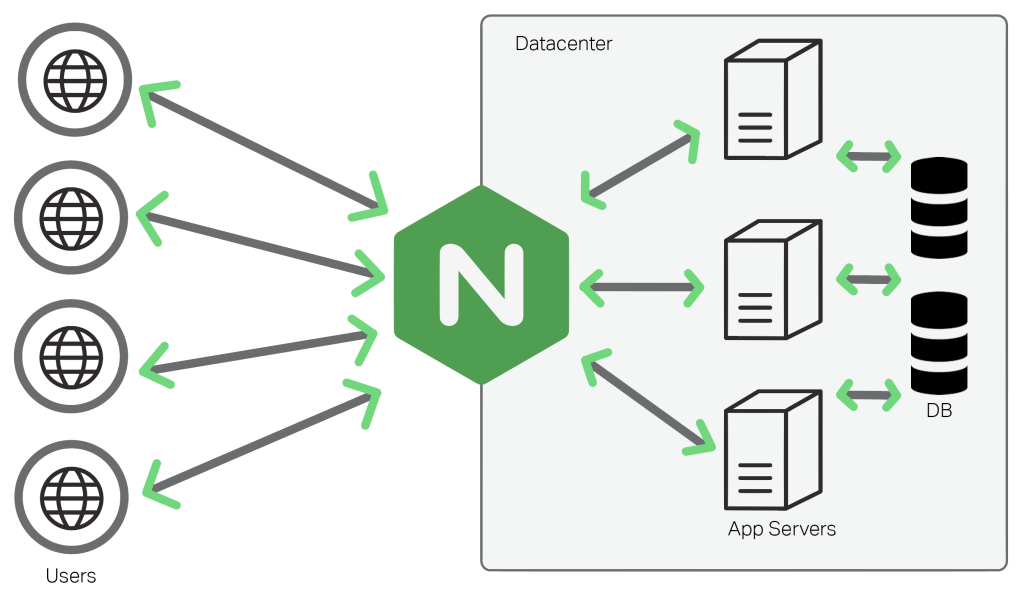
NGINX Open Source [engine x] is an HTTP and reverse proxy server, a mail proxy server, and a generic TCP/UDP proxy server
Tutorial
Domain binding
The precondition for binding a domain is that application can accessed by domain name, then complete below:
-
Connect your Server by SFTP tool
-
Modify Nginx vhost configuration file, change the server_name's value to your domain name
server
{
listen 80;
server_name www.example.com;  # 此处修改为你的域名
index index.html index.htm index.php;
root  /data/wwwroot/www.example.com;
...
} -
Restart Nginx service
sudo systemctl restart nginx
Change root directory
Just need to modify root item's value for yourself:
server
{
listen 80;
server_name example.yourdomain.com;
index index.html index.htm index.php;
root  /data/wwwroot/example;...
}
Nginx configure wizard
Nginx configure GUI wizard to reduce complexity
Set Rewrite
There are three steps to using and set Nginx Rewrite:
- Make sure Rewrite module is enabled
- Add your Rewrite rules file at /etc/nginx/conf.d/rewrite
- Make sure you have include Rewrite rules file at your Nginx vhost file
server
{
listen 80;
server_name mysite2.yourdomain.com;  # 此处修改为你的域名
index index.html index.htm index.php;
root  /data/wwwroot/mysite2;
...

## Includes one of your Rewrite rules if you need, examples
include conf.d/rewrite/wordpress.conf;  # 引入你的伪静态规则
}
.auth_basic for authentication
You can use Nginx .auth_basic for your application's external authentication:
- Modify the password at /etc/nginx/.htpasswd/htpasswd.conf file
htpasswd -b /etc/nginx/.htpasswd admin new_password - Restart the Nginx service
sudo systemctl restart nginx
Set the Max open files
At /etc/security/limits.conf file:
*   soft nofile   65535
*   hard nofile   65535
Parameters
Path
Different Linux distributions have different installation paths:
CentOS/RedHat/Fedora
Nginx configuration directory: /etc/nginx/conf.d
Nginx vhost configuration file: /etc/nginx/conf.d/default.conf
Nginx main configuration file: /etc/nginx/nginx.conf
Nginx logs file: /var/log/nginx
Nginx rewrite rules directory: /etc/nginx/conf.d/rewrite
Ubuntu/Debian
Nginx configuration directory: /etc/nginx
Nginx vhost configuration file: /etc/nginx/sites-available/default
Nginx main configuration file: /etc/nginx/nginx.conf
Nginx logs file: /var/log/nginx
Nginx rewrite rules directory: /etc/nginx/conf.d/rewrite
CLI
You can run the command nginx -h to list all Nginx CLI
$ nginx -h
nginx -s reopen #重启Nginx
nginx -s reload #重新加载Nginx配置文件,然后以优雅的方式重启Nginx
nginx -s stop #强制停止Nginx服务
killall nginx #杀死所有nginx进程
nginx -s quit #优雅地停止Nginx服务(即处理完所有请求后再停止服务)
nginx -t #检测配置文件是否有语法错误,然后退出
nginx -v #显示版本信息并退出
nginx -V #显示版本和配置选项信息,然后退出
nginx -t #检测配置文件是否有语法错误,然后退出
nginx -T #检测配置文件是否有语法错误,转储并退出
nginx -q #在检测配置文件期间屏蔽非错误信息
nginx -?,-h #打开帮助信息
nginx -p prefix #设置前缀路径(默认是:/usr/share/nginx/)
nginx -c filename #设置配置文件(默认是:/etc/nginx/nginx.conf)
nginx -g directives #设置配置文件外的全局指令
Service
sudo systemctl start nginx
sudo systemctl stop nginx
sudo systemctl restart nginx
sudo systemctl status nginx
server template
server template is the Nginx vhost section at configuration file
HTTP server
server
    {
    listen 80;
    server_name yourdomain.com-error.log;
    index index.html index.jsp index.php;
    root  /data/wwwroot/yoursite;
    error_log /var/log/nginx/yourdomain.com-error.log-error.log crit;
    access_log  /var/log/nginx/yourdomain.com-error.log-access.log;
    include conf.d/extra/*.conf;

    ## Includes one of your Rewrite rules if you need, examples
    # include conf.d/rewrite/wordpress.conf;
    # include conf.d/rewrite/joomla.conf;
    }
include extra/*.conf;

#------------- SSL Start --------------

#------------- SSL End  ---------------
}
HTTPS server
HTTPS section add to HTTP server section
server
    {
    listen 80;
    server_name yourdomain.com-error.log;
    index index.html index.jsp index.php;
    root  /data/wwwroot/yoursite;
    error_log /var/log/nginx/yourdomain.com-error.log-error.log crit;
    access_log  /var/log/nginx/yourdomain.com-error.log-access.log;
    include conf.d/extra/*.conf;

    ## Includes one of your Rewrite rules if you need, examples
    # include conf.d/rewrite/wordpress.conf;
    # include conf.d/rewrite/joomla.conf;
    }

    include extra/*.conf;

    #-----HTTPS template start------------
    listen 443 ssl;
    ssl_certificate /data/cert/xxx.crt;
    ssl_certificate_key /data/cert/xxx.key;
    ssl_session_timeout 5m;
    ssl_protocols TLSv1 TLSv1.1 TLSv1.2;
    ssl_ciphers ECDHE-RSA-AES128-GCM-SHA256:HIGH:!aNULL:!MD5:!RC4:!DHE;
    ssl_prefer_server_ciphers on;
    #-----HTTPS template end------------
}
HTTP uwsgi
server {
    listen 80;
    server_name yoursite1.yourdomain.com;

    location / {
        include uwsgi_params;
        uwsgi_read_timeout 3600;
        uwsgi_pass 127.0.0.1:8001;
        }

    location  ~/static/ {
        expires 30d;
        autoindex on;
        add_header Cache-Control private;
        root /data/wwwroot/mydjango/mysite1;
        }

    error_log /var/log/nginx/yourdomain.com-error.log error;
    access_log  /var/log/nginx/yourdomain.com-access.log;

    include extra/*.conf;

    #------------- SSL Start --------------

    #------------- SSL End  ---------------
    }
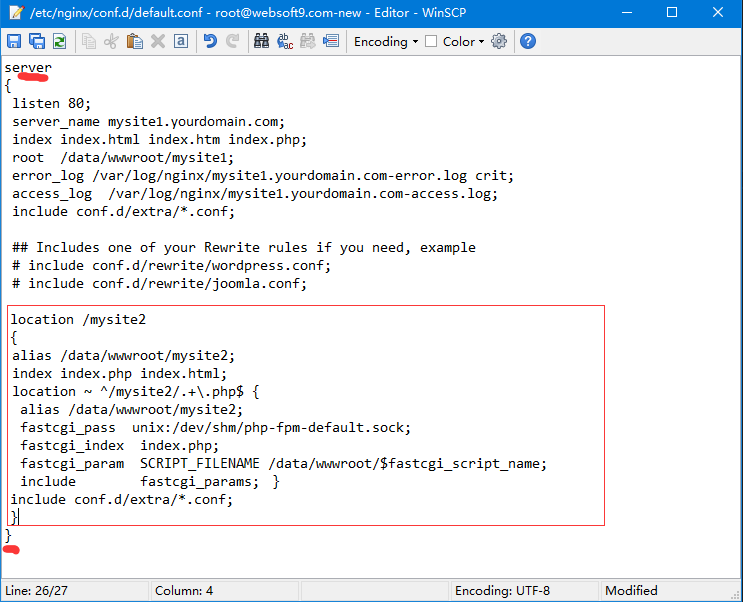
HTTP Alias
Alias section should insert at server
location /mysite2
{
alias /data/wwwroot/mysite2;
index index.php index.html;
location ~ ^/mysite2/.+\.php$ {
alias /data/wwwroot/mysite2;
fastcgi_pass  unix:/dev/shm/php-fpm-default.sock;
fastcgi_index  index.php;
fastcgi_param  SCRIPT_FILENAME /data/wwwroot/$fastcgi_script_name;
include        fastcgi_params; }
include conf.d/extra/*.conf;
}
HTTP Proxy
server {
    listen 80;
    server_name yoursite1.yourdomain.com;
    location / {
        proxy_pass  http://127.0.0.1:8001;
        proxy_redirect     off;
        proxy_set_header   Host             $host;
        proxy_set_header   X-Real-IP        $remote_addr;
        proxy_set_header   X-Forwarded-For  $proxy_add_x_forwarded_for;
        proxy_set_header   X-Forwarded-Proto $scheme;
        proxy_set_header Upgrade $http_upgrade;
        proxy_set_header Connection upgrade;
        proxy_next_upstream error timeout invalid_header http_500 http_502 http_503 http_504;
        proxy_max_temp_file_size 0;
        proxy_connect_timeout      90;
        proxy_send_timeout         90;
        proxy_read_timeout         90;
        proxy_buffer_size          4k;
        proxy_buffers              4 32k;
        proxy_busy_buffers_size    64k;
        proxy_temp_file_write_size 64k;
}
error_log /var/log/nginx/yourdomain.com-error.log error;
access_log  /var/log/nginx/yourdomain.com-access.log;

include extra/*.conf;

#------------- SSL Start --------------

#------------- SSL End  ---------------
}