Moodle Maintenance
This chapter is special guide for Moodle maintenance and settings. And you can refer to Administrator and Steps after installing for some general settings that including: Configure Domain, HTTPS Setting, Migration, Web Server configuration, Docker Setting, Database connection, Backup & Restore...
Maintenance guide
Moodle courses Backup and Restore
Courses are very import resource of Moodle, you can set an automatic backups for Moodle Courses
-
Log in Moodle console as administrator
-
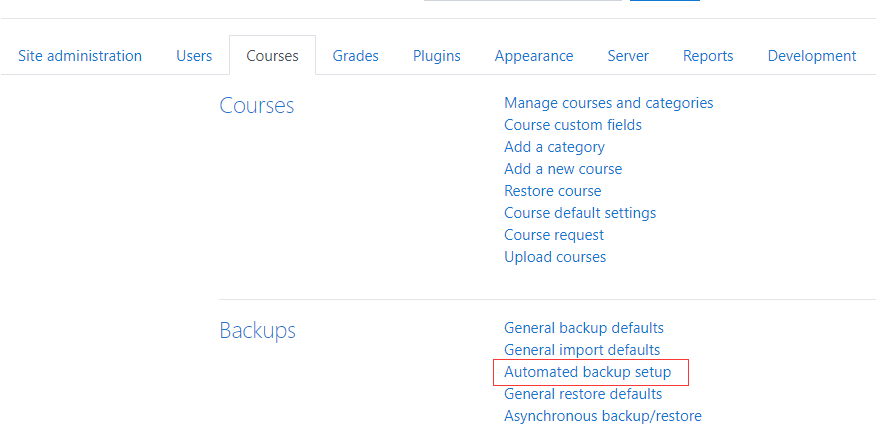
Open Site administrator > Courses > Backups to set automatic backup
-
Set it by yourself
-
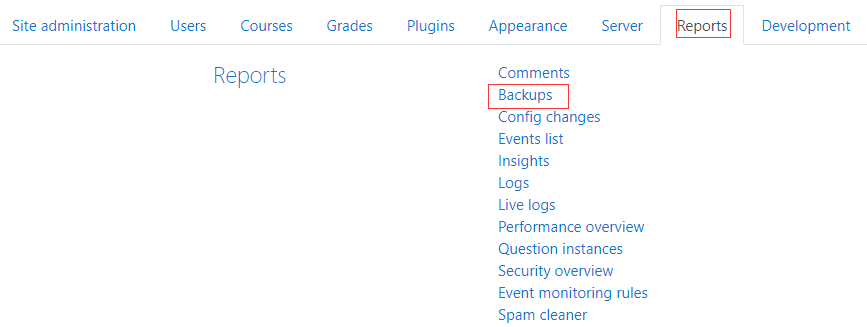
Open Site administrator > Reports > Backups to view the backup result
Moodle Upgrade
Moodle provided multiple upgrade methods, includes: automatic upgrade, upload source code for upgrading, using CLI for upgrading
The following steps will introduce how to upgrade by CLI:
-
Use SSH to connect your Moodle Server
-
Run the following commands for upgrading
cd /data/wwwroot/moodle/admin/cli
php upgrade.php -
The system will start upgrade
More detail please refer to Moodle official docs Moodle Upgrading
Troubleshoot
In addition to the Moodle issues listed below, you can refer to Troubleshoot + FAQ to get more.
FAQ
Moodle support multi-language?
Yes
Can I install plugins of Moodle online?
Yes, if you have signed in Moodle you can install plugins from Console directly
Moodle 开源版提供 APP?
有待进一步调查
Moodle 能上传多媒体文件吗?
可以
Moodle 旗下有哪些产品?
- Moodle LMS:开源的在线学习系统
- Moodle Workplace:Moodle LMS + 高级功能,不开源
- MoodleCloud:Moodle LMS 托管服务,即 SaaS 版
- Moodle App:移动端
- MoodleNet:共享和管理开放教育资源